Cute Bats Twitch Panels with Stars: A Playful Way to Spook Up Your Stream
Why Cute Bats Twitch Panels with Stars Work for Streamers of All Niches
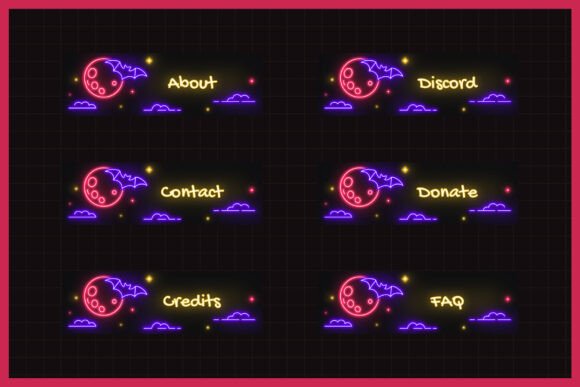
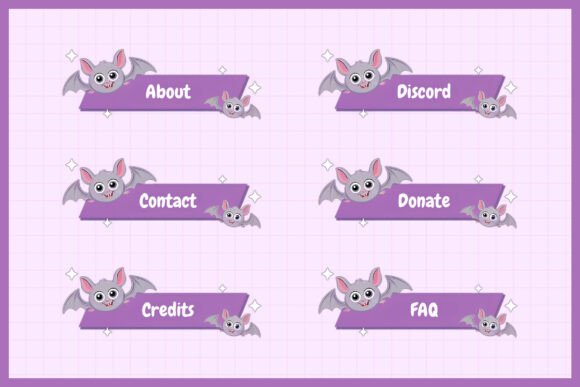
Adding personality to your Twitch channel doesn’t have to be complicated. The Cute Bats Twitch Panels with Stars offer a quick, stylish way to bring a bit of kawaii charm and spooky flair to your stream’s layout. Designed with a vibrant purple background, flying bats, and twinkling stars, these panels are more than just decorative—they’re functional tools that help you organize your content while engaging your audience visually.
Whether you're a horror streamer, a creative artist, or someone who just loves a good aesthetic, these panels can help you stand out. Their playful design is especially appealing to younger audiences and fans of anime, gaming, and pop culture. Let’s explore how different types of streamers can use them effectively.
How Horror Streamers Can Lean Into the Vibe
If you specialize in horror games like Resident Evil, Dead by Daylight, or Phasmophobia, the Cute Bats Twitch Panels with Stars can help set the tone without feeling too intense. The bats and stars add a whimsical twist that balances the scariness of your content, making your channel feel more inviting and less overwhelming.
For example, using the “Schedule” panel with a bat motif helps viewers know when to expect your next chilling session. The “Discord” and “About” panels become more engaging when wrapped in a theme that matches your vibe. This subtle cohesion builds brand identity and makes navigation feel intuitive.
Artists and Creative Streamers Can Add Charm
Visual artists, digital illustrators, and creators who stream their process can benefit from using these panels to reflect their personality. The soft purple tones and cute bat illustrations pair well with softer, fantasy-inspired art styles. Even if you don’t stream horror content, the panels can add a touch of spooky fun during seasonal events like Halloween or themed art challenges.
For instance, if you're streaming a “Speed Paint Halloween Character Design” session, the “Games” and “Schedule” panels can help viewers understand what’s coming up. The “Shop” and “Donate” panels also become more visually appealing, subtly encouraging support without feeling pushy.
Gaming Streamers Can Use Panels to Improve Navigation
For general gaming streamers, organization is key. The Cute Bats Twitch Panels with Stars come with 21 unique designs, including essential panels like “Socials,” “Rules,” and “Links.” These help viewers quickly access your other platforms, understand your streaming schedule, and engage with your community.
Imagine using the “Rules” panel to outline your chat guidelines in a fun, non-intimidating way. Or the “Donate” and “Subscribe” panels encouraging support with a cute, thematic design. These panels help reduce clutter while maintaining a consistent visual theme across your channel.
Content Creators Beyond Twitch Can Repurpose These Panels
While these panels are designed for Twitch, their high-quality .png format makes them easy to repurpose for YouTube thumbnails, Discord banners, or even Instagram story templates. Creators who run cross-platform content can maintain a cohesive aesthetic without spending extra time designing from scratch.
If you're running a Halloween-themed livestream on YouTube or a Discord event for your Twitch followers, the same panels can be resized and reused. This flexibility makes the Cute Bats Twitch Panels with Stars a valuable asset for content creators who want to maintain a consistent brand across platforms.
What to Consider Before Using Cute Bats Twitch Panels
Before diving in, it’s important to consider how well these panels align with your overall brand. While the design is playful and versatile, it may not fit every streamer’s vibe. If your content is more serious or minimalist, these panels might feel out of place.
Also, since the panels are pre-designed, customization options are limited unless you have graphic design tools. If you want to tweak colors or add custom text, you may need to use a photo editor like Photoshop or Canva to make adjustments before uploading them to Twitch.
Maximizing the Use of Cute Bats Twitch Panels
To get the most out of the Cute Bats Twitch Panels with Stars, consider how each panel serves a specific function. Use the “Wishlist” panel to promote your Amazon or Ko-fi list. The “FAQ” and “Credits” panels help reduce repetitive questions in chat, freeing you up to focus on your stream.
Another smart use is combining panels for seasonal events. During October, you might highlight the “Halloween Games” section using the “Games” panel and link it to your schedule. In December, you could use the “Donate” and “Wishlist” panels to promote holiday support.
Who Benefits Most from These Panels?
Streamers who thrive on visual storytelling and community engagement will find the most value in these panels. Whether you're a new streamer trying to build a recognizable brand or a veteran looking for a seasonal refresh, the Cute Bats Twitch Panels with Stars offer a quick, effective way to elevate your channel’s look.
- Beginners: Easy to set up and visually appealing, they help new streamers create a polished presence from day one.
- Intermediate Streamers: These panels help refine your layout and improve viewer navigation, which is crucial as your audience grows.
- Established Streamers: Use them seasonally or as part of themed content drops to keep your channel fresh and engaging.
Final Thoughts on Using Cute Bats Twitch Panels
The Cute Bats Twitch Panels with Stars aren’t just about looks—they’re about creating a smoother, more engaging experience for your viewers. Whether you're looking to add a bit of spooky charm, organize your channel, or simply give your stream a visual boost, these panels offer an easy, effective solution.
From horror streamers to creative artists and general gaming personalities, these panels provide a flexible, fun way to enhance your Twitch presence. Just remember to match them with your brand, consider any customization needs, and use them strategically to guide your audience where you want them.